Resume photos: pros, cons, and when to include one
Should you include a picture on your resume? When preparing your next application, this question may be on your mind. Whether you include a headshot affects how recruiters see you. There are times when it can boost your chances, and times when it will hinder them. It’s your job to know the difference. Let’s talk about it.

You’ve nailed your application, but there’s one more decision to make: Should you put your picture on your resume? If you want to win over a recruiter, understanding whether this is appropriate is a must. It only takes one mis-step to harm your chances.
Chances are, you’ve read a lot of confusing advice about this topic. Luckily, we’re here to clear things up. In the following guide, we will be covering:
- When you should and shouldn’t include a picture on your resume
- The advantages and disadvantages to adding a photo to a resume
- Tips to help you choose good resume pictures every time
- What to do instead of including a picture on your resume
- The frequently asked questions when it comes to this topic
Ready to decide whether a headshot is the way to go? Read on to find out the facts.
 Should you include a photo on your resume?
Most of the time, the answer is no. Especially if you’re applying for a job in the US.
However, there are exceptions to that rule. When deciding whether to include a picture on your resume, here are some of the factors you’ll want to keep in mind:
Country or region
Resume photos are common in some countries, but are relatively unheard of in others. In fact, sometimes they’re outright discouraged. Let’s break it down:
- In the US and Canada, it’s not common to include a photo on your resume. (However, in some industries or roles, it may be expected… We will cover this later.)
- The UK and Ireland follow similar rules. Most of the time, there’s no reason for you to include a picture on your resume.
- In many European and Asian countries, on the other hand, photos are common on resumes. You should consider this if you’re applying to roles in these regions.
- Across Africa (in countries like Egypt, Uganda, and Ghana) it is common to include a picture on your resume.
- The same is true for the Americas (such as Guatemala, Argentina, and Colombia). In these countries, recruiters expect to see headshots on applications.
Before deciding whether to include a photo on your resume, always check the best practices for the country you’re applying in. That way, you can follow the standard advice.
Anti-bias and legal considerations
A picture is worth a thousand words, and it can tell a recruiter more about you than they need to know. If the recruiter has any unconscious biases, they could discriminate against you based on your headshot. That’s murky territory, and could be illegal.
In the US, there are Federal anti-discrimination laws to prevent hiring decisions based on protected characteristics (1). These include age, race, gender, and disability. Including a photo on your resume shares these characteristics with the recruiter, opening them up to any biases.
Industry or job type
The job market is dynamic. While there’s a blanket rule for most countries, certain industries and jobs can defy the norm. Check out some of the roles in which resume photos are standard:
- Modeling. Should your job rely predominantly on your looks, it’s natural to include a photo on your resume. You may also submit a portfolio of work.
- Acting. Similarly, casting agents need to see what an actor looks like before inviting them for an audition. Actors often have showreels to demonstrate their talents.
- Broadcasting and media. If you’re the on-air talent for a media outlet, how you look will ultimately come into the hiring process. You may want to include a headshot.
Additionally, if the job advert specifically requests a resume picture, you should include one. This shows you can follow directions and pay close attention to detail.
Consider the Applicant Tracking System (ATS)
Most large organizations now use Applicant Tracking Systems (ATS) to review incoming resumes. Before a human recruiter ever sets eyes on your application, this software will have ranked it, based on the information it can extract from the document.
Unfortunately, imagery can be a problem for the ATS.
Including a photo on your resume may mean the system struggles to parse surrounding text correctly. The ATS may miss out crucial information on your resume, lowering your chances of scoring well in the system.
It doesn’t end there. If your picture is high resolution, it may be too big for the ATS software. That could mean that your application won’t submit at all, and you’ll lose your chances.
Advantages and disadvantages of an image on your resume
We’ve already covered when you should (and shouldn’t) include a picture on your resume, but what about the pros and cons?
Next up, we break down the advantages and disadvantages of having a headshot on your next resume.
Pros of a photo on your resume
- It helps build a professional brand. If you’re a spokesperson, public speaker or solopreneur, your brand matters. Seeing your headshot on a resume reinforces your identity, and can make you more recognizable.
- It’s the norm for performance roles. As we’ve covered, models, actors, and TV broadcasters should all put headshots on their resume. If your job relies on the way you look, get ahead of the competition with a resume picture.
- It can establish credibility. Going for a client-facing role? Having a photo on your resume can make all the difference. This may make you look more credible, but beware of unconscious biases and legal implications.
- Some employers prefer them. If the recruiter or job advert specifies you need a headshot on your application, that’s all you need to know. Some businesses prefer that you use them, and this always trumps any other advice.
Cons of a photo on your resume
- Photos may not be processed by the ATS. It might not be a good idea to include photos if you’re trying to build an ATS-friendly resume. Some software might have trouble scanning resumes with photos.
- They invite unconscious bias. Photos make an immediate impression and enable recruiters to unconsciously judge you on your appearance, which can invite gender, age, race, and attractiveness bias.
- Adding a photo takes up space. Resume real estate is valuable. A photo takes up valuable space on your resume that you could use to list additional skills. This is especially important for job seekers who have a lot of experience to list.
- It’s “unprofessional” in some fields. Some industries, like tech, finance, and law, believe that resume photos are unprofessional and unnecessary. Adding a headshot to your resume could destroy your chances of success before you’ve gotten started.
Tips for including a photo on your resume
So, you’ve decided your resume will benefit from a photo. Before you add your favorite picture to your application, you need to know the ground rules. Use the following tips to ace it:
1. Use a clear, light background
Is your photo background looking “busy”? Patterned wallpaper, outdoorsy backgrounds, and bookshelves can do more harm than good. You might want to switch it up. Opt for a plain white, light gray, or pale blue backdrop. This gives your headshot a professional vibe.
2. Smile (and make it natural)
The way you smile tells the recruiter what type of person you are. People can often spot fake smiles, so try to chill and look natural. Avoid forced grins or serious faces, as these can give the wrong impression. Instead, relax your shoulders, take a deep breath, and smile.
3. Dress for the job you want
The recruiter may only be able to see your shoulders in a headshot. But that doesn’t mean you shouldn’t dress the part. Casual attire will make you look like you’re not serious about the role. Instead, go for either business casual (a shirt or blouse) or formal clothing (a suit and tie). Before deciding what to wear, check out the company’s site to get a feel for the culture.
4. Perfect the size and position
When including a picture on your resume, go for a square shape. Aim for roughly 2 x 2 inches (5 x 5 cm). The photo should go in the top right or top left corner of your resume. Remember, it’s not the main event. It should take up no more than 5-10% of your total page space.
5. Get the framing on point
Be sure to frame your photo properly. That means positioning the camera straight on so that it’s level with your face. You should also leave some space above the top of your head. You may want to twist your body slightly and keep your face toward the camera.
6. Use natural (or soft) lighting
If you’re taking the photo during the daytime, make the most of natural light. You can position yourself facing a window, for example. The best time of day to do this is during “golden hour” a little before the sun sets. Another option is to use diffused artificial lighting that doesn’t create shadows of dark spots on your face.
Expert Tip:
Modern resumes nearly always include links to social media profiles, such as LinkedIn. If you’re determined to include a resume photo but aren’t sure if it’s appropriate, just make sure to have a professional picture on your LinkedIn profile. That way, if a recruiter is interested in you, they can navigate to your social media and you’ll still reap the benefit of sticking in their memory.
Common mistakes to avoid when including a photo on your resume
Taking a resume photo is an art form. All too many candidates make the same obvious mistakes when they first get started. Here are some you should avoid:
- Using party or vacation photos: You don’t want your future boss to see you with a margherita in your hand on the beach. Save those pictures for your friends and family. Resume photos need to be professional. You might think you can crop the background of a bar out of the picture, but recruiters will be able to tell.
- Taking selfies for your resume: Selfies are convenient, since you don’t need to bother anyone else to take one. However, they hardly send out a professional message. Ask a friend or a professional to help you take your picture. You can also use the timer function on your camera to take it yourself, as long as your arm isn’t in the photo.
- Trying too hard in the picture: Keep things nice and simple. Going overboard with flashy outfits, intense makeup, or an OTT hairstyle is a mistake. Yes, you want to stand out from the crowd, but it has to be for the right reasons. Your resume picture should be professional and understated.
- Using a group picture: If the only photo you have of yourself is in a group, it's better to leave it off your resume. Group pictures are unprofessional and could cause confusion about who the resume is about. Additionally, these pictures tend to be much more casual than your average headshot.
- Accessorizing in the picture: Having hair over your eyes, a sports cap on, or sunglasses is never a good idea. Anything that obscures your face (with the exception of glasses) is a no-go. You need to make sure your features are clear and visible.
Use a photo that’s simple, professional, and high-quality. If you need inspiration, try browsing LinkedIn and looking at people’s profile pictures – they’re pretty similar to the ideal resume photo.
You can also check out CVwizard’s Resume Templates to see some examples of resumes with photos. This gives you a great idea of how to take a picture and how to format it.
Example of resumes with and without photos
When you've selected the perfect resume photo, the next step is to add it to your application. Here's how your picture may look on a well-designed resume:
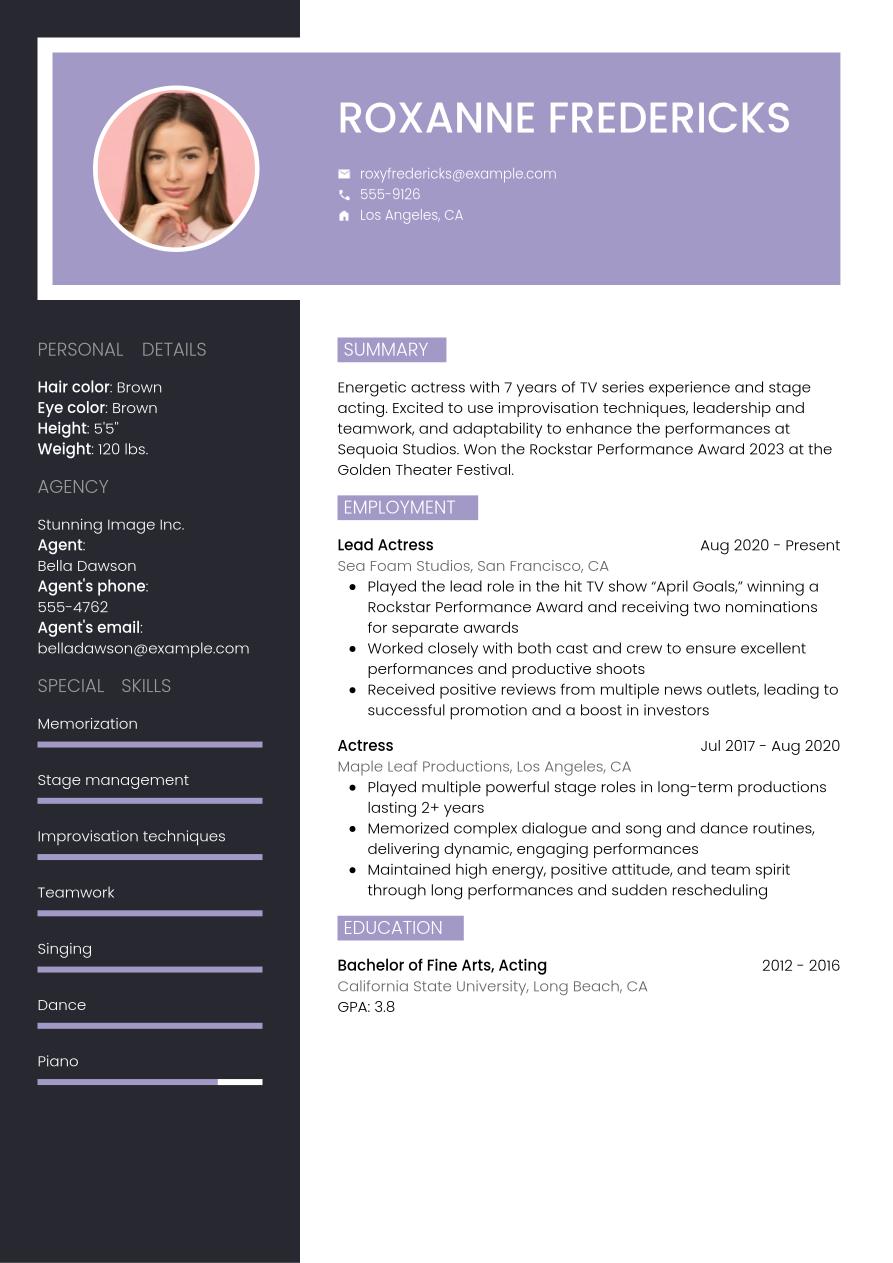
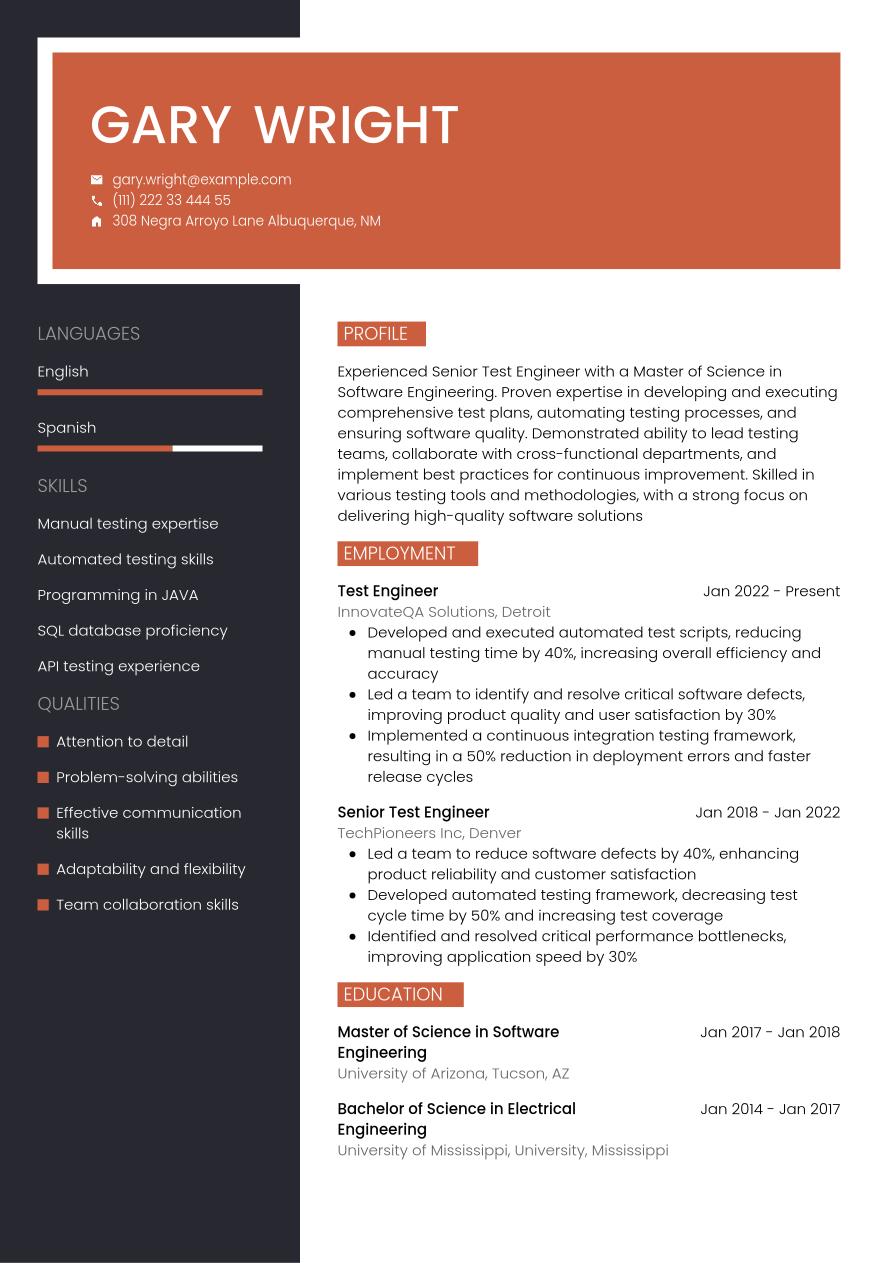
Of course, most of the time, there's no need to include a picture on your resume. With that in mind, here's an example of a resume without a picture:
What to do instead of including a photo on your resume
Rather than adding a photo to your resume, there are other ways you can present yourself professionally. Your looks are not the only thing that sells your professional brand.
Here are some of the ways you can enhance your resume without including a headshot.
Link to your professional networking profile
The rules of online networking are different to resumes. Photos are very much encouraged, especially if you want to build some credibility. Adding a link to a LinkedIn profile may be the way to go. That way, the recruiter will see a photo of you without it being on your resume. Make sure the info on your resume matches your profile exactly.
Include a business card
Submitting a hard copy of your resume? If you work in sales or a customer-facing role, you may want to include a business card too. You get bonus points if the card is branded in the same style and colors as your resume and cover letter.
Refer to a blog or social media account
For some roles, such as a social media executive or writer, your online presence could swing your application. If it’s appropriate, refer to your blog or social media accounts. Consider what these sites tell the recruiter about you before doing so. For instance, if you have a following of 10K+ on Instagram, and you’re going for a content creation role, that could work in your favor.
Add a link to your personal portfolio or website
When you work in a creative field, having a personal portfolio or website is a great way to showcase your talents. Rather than including a picture on your resume, consider using that space to link to either one of these sites.
Examples of photos for your resume
Sometimes, the best way to understand what makes a bad resume photo, and what makes a good one, is to see for yourself. Luckily, you've come to the right place.
Good examples of pictures for your resume
Looking for some inspiration? Here are some great examples of resume photos:
 The above resume pictures are:
- Clear with no excessive background mess
- Well-lit (with natural or artificial lighting)
- Professional with the candidates wearing formal attire
- Approachable since they are smiling naturally
Bad examples of pictures for your resume
Next, let's take a look at how a bad resume photo might appear:
 These resume photos are:
- Not great quality with poor backgrounds
- Include accessories that cover the face
- Feature forced smiles or frowns
- Unprofessional as the candidates are wearing casual clothing
The takeaway: Usually avoid photos
Including a photo on your resume is usually a bad idea. However, as we’ve covered, there are times when you may want to buck the trend and do it anyway. It’s all about pitching yourself correctly, depending on the job and the country.
Ready to work on your next resume? Keep the following advice in mind:
- Most of the time, there’s no need to include a picture on your resume
- If you are an actor, model, or TV personality, you can include one
- Read the job description to see if it asks for a headshot (and include one)
- If you do add a picture, make sure it’s professional, well-lit, and framed properly
Whether you are including a photo on your resume or not, you can check out CVwizard’s Resume Builder as the next step to create a beautiful, simple resume in minutes. And see many resume examples that are expertly designed for each profession to get inspiration from.
Frequently asked questions (FAQs)
Is it unprofessional to include a photo on your resume?
Yes. In most industries and countries, it’s considered unprofessional to include a photo on your resume.
However, there are exceptions, including:
- You’re a model or actor
- You work in TV broadcasting
- The job description requests a headshot
- You’re applying overseas (e.g. in Africa)
Does a resume photo affect ATS (Applicant Tracking System) compatibility?
Yes, it can do.
Including a picture on your resume may mean the ATS cannot parse some of the text around it. This may mean you score poorly in the system, despite having a good application.
If the photo is high resolution, it can present further problems. It may mean the file size of your resume is too large for the ATS system.
Should I include a picture if I am applying for remote jobs?
Not necessarily.
For most remote jobs, the same rules apply as any other application. That is to say that you typically should not include a photo on your resume.
However, if you’re applying to a remote role in which resume photos are the norm, you may want to include one. Check the region’s standards before making a decision.
Is it better to include a QR code linking to my profile instead of a photo?
No. A QR code may confuse the ATS software.
If you would like to link to your profile or portfolio, use a hyperlink instead. That way, you can be sure that it won’t interfere with the system.
What are alternatives to resume photos for standing out visually?
A well-designed resume template creates visual impact without a photo. Look for clean layouts with clear section divisions and professional typography.
Use white space strategically. Choose readable fonts like Calibri, Arial, or Garamond. Stick with one font throughout, varying only size and weight for headers.
You can also add subtle color if you want. Navy or dark gray headers work well, but limit color to section dividers. However, you should keep body text black.
Sources

Make an impression with your resume
Create and download a professional resume quickly and easily